
Google SEO Analyzer: How to Check and Improve Your Website’s Search Performance
Google SEO Analyzer: How to Check and Improve Your Website
A Google SEO analyzer can help you understand how well your website is performing in search and where there may be room to improve. The term is often used to describe tools that assess a site’s technical health, page speed, mobile usability, content and visibility in Google Search.
There is not one official Google product called “Google SEO Analyzer”. Instead, Google provides several tools that examine different parts of your website. Used together, they can give you a clearer picture of what is working and what needs attention.
What does an SEO analyzer check?
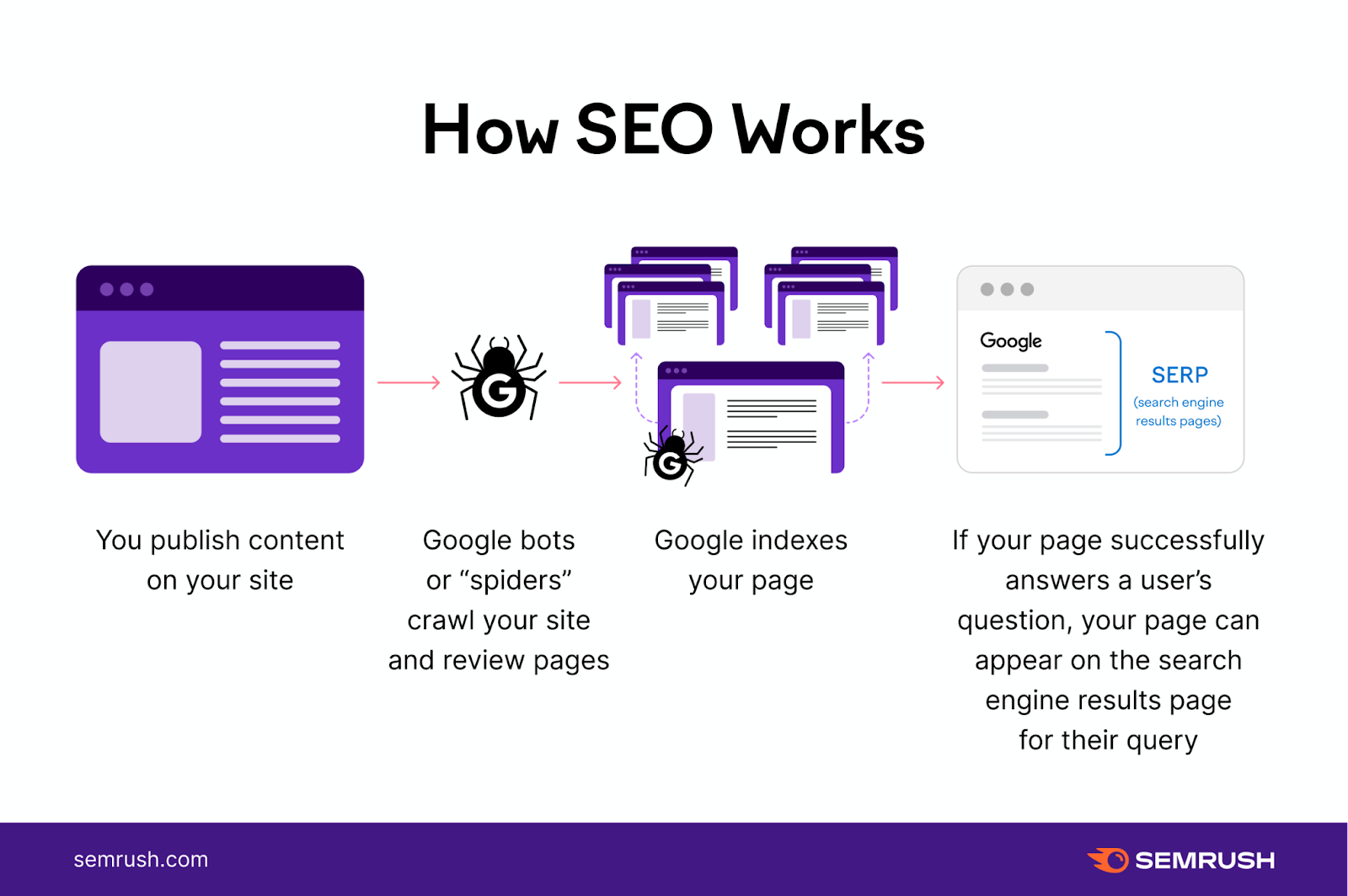
An SEO analysis usually looks at factors that can affect how search engines discover, understand and display your pages. These may include:
- Crawling and indexing: Can Google access important pages and include them in its index?
- Page titles and descriptions: Do your title tags and meta descriptions accurately describe each page?
- Content: Does the page clearly answer the visitor’s question and provide useful, original information?
- Mobile usability: Is the site easy to use on phones and tablets?
- Page experience: Do pages load promptly and respond smoothly to user interactions?
- Structured data: Is relevant information marked up in a way Google can understand?
- Links: Can visitors and search engines move easily between related pages?
Google tools for analysing SEO
Google Search Console
Google Search Console is one of the most useful tools for understanding how your website appears in Google Search. It reports on search queries, impressions, clicks and average positions, and can flag indexing or technical issues. You can also submit a sitemap and inspect individual URLs to see whether Google has indexed them.
Search Console data can help you spot pages that receive impressions but few clicks. This may suggest that the page title or description could be made clearer or more appealing. Search performance figures are useful indicators, but they do not guarantee that a particular change will improve rankings.
PageSpeed Insights
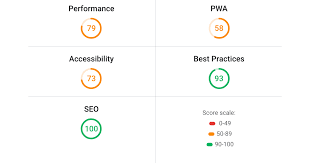
PageSpeed Insights assesses a page’s loading performance on mobile and desktop. Where field data is available, it reports how real users experience the page. It also provides diagnostic information and suggestions for improving performance, such as reducing large image files or addressing resources that delay page rendering.
Performance is only one part of SEO. A high score is not a guarantee of strong rankings, and a lower score does not automatically mean a page will perform poorly in search. Use the recommendations to identify meaningful improvements for visitors, rather than pursuing a perfect score at any cost.
Lighthouse
Lighthouse is an open-source auditing tool available in Chrome DevTools and other environments. It can assess performance, accessibility, best practices and aspects of search optimisation. Its results are useful for diagnosing specific pages, but scores can vary depending on the testing conditions.
Rich Results Test
The Rich Results Test checks whether eligible structured data on a page can support certain enhanced search results. Passing the test does not guarantee that Google will show a rich result. Structured data must also be accurate, relevant and consistent with the visible page content.
How to use a Google SEO analyzer
- Start with your goals. Decide whether you want to improve organic traffic, fix indexing issues, increase enquiries or make key pages easier to use.
- Check Search Console. Review indexing reports and search performance, then identify pages or queries that deserve attention.
- Test important pages. Run key landing pages, product pages and articles through PageSpeed Insights or Lighthouse.
- Prioritise issues. Resolve problems that prevent important pages from being crawled or used before focusing on minor recommendations.
- Improve the page itself. Make content clear, accurate and genuinely helpful. Use descriptive headings and page titles, and organise information logically.
- Review changes over time. Track performance after updates, allowing enough time for Google to recrawl pages and for meaningful data to appear.
Understanding the results
SEO tools provide evidence and suggestions, not a complete verdict on your website. Automated checks may miss context: for example, a tool can identify a missing heading, but it cannot always judge whether the content fully satisfies a searcher’s needs.
Look for patterns rather than reacting to every warning. A crawling error on an important page may need urgent attention, while a small performance recommendation on a rarely visited page may be less pressing. Consider the impact on visitors, the importance of the page and the effort required to fix the issue.
Common mistakes to avoid
- Chasing scores instead of users: A tool score is not the same as a successful customer experience.
- Making changes without checking the cause: Confirm what an issue means before editing code or removing content.
- Expecting instant ranking changes: SEO improvements can take time to be crawled, processed and reflected in search results.
- Using automated recommendations blindly: Review suggested changes to ensure they suit your site and audience.
- Ignoring content quality: Technical health matters, but pages also need to be useful, trustworthy and easy to understand.
Conclusion
A Google SEO analyzer is best understood as a combination of tools and checks rather than a single magic solution. Google Search Console, PageSpeed Insights, Lighthouse and the Rich Results Test can each reveal different opportunities. By combining their findings with careful judgement and a focus on visitors, you can build a practical SEO improvement plan and monitor how your website develops over time.
18 Common Questions About Using Google SEO Analyser
- How do I check my SEO score?
- How can I check my SEO score for free?
- How do I use Google SEO?
- Does Google have an SEO checker?
- What is Google SEO score?
- How do I analyze SEO for my website?
- How do I check my SEO ranking?
- How do I get my SEO score?
- What is SEO Analyzer?
- How can I check my SEO?
- How do I check my SEO score on Chrome?
- Is SEO free on Google?
- Is SEO Analyzer free?
- What 3 Google tools would you use for SEO?
- How can I check my SEO performance?
- Is 100 SEO score good?
- Is there a free SEO checker?
- How do I check my SEO on Google?
How do I check my SEO score?
To check your SEO score, run your website or a specific page through an SEO analysis tool, such as Google Search Console, PageSpeed Insights or Lighthouse. These tools review different aspects of performance, including indexing, page speed, mobile usability and technical issues; there is no single official Google SEO score. Use the results as guidance, prioritise problems that affect important pages or visitors, and review your site’s search performance in Google Search Console over time.
How can I check my SEO score for free?
You can check your SEO for free using Google Search Console to review search visibility, indexing and technical issues, and PageSpeed Insights to assess page speed and user experience. Free SEO audit tools can also provide a combined score, but there is no single official Google SEO score, and results vary between tools. Treat scores as helpful guidance: focus on fixing important issues and improving your pages for visitors rather than chasing a perfect number.
How do I use Google SEO?
To use Google SEO effectively, create helpful, original content that answers your audience’s questions, organise your website with clear page titles and headings, and make sure it works well on mobile devices. Set up Google Search Console to monitor indexing, search queries and website issues, and use tools such as PageSpeed Insights to check page performance. SEO takes time, so review your results regularly and make improvements based on what visitors need rather than focusing solely on rankings.
Does Google have an SEO checker?
Google does not offer a single, all-in-one SEO checker, but it provides several free tools that help you assess different aspects of your website. Google Search Console reports on search visibility, indexing and technical issues, while PageSpeed Insights checks page performance and Lighthouse offers further audits, including accessibility and SEO-related checks. Used together, these tools can help you identify areas to improve, although their recommendations should be considered alongside your site’s content, audience and goals.
What is Google SEO score?
Google does not provide a single official “SEO score” for websites. The term usually refers to a rating generated by a third-party SEO tool, based on factors such as page speed, mobile usability, technical setup and on-page content. These scores can help highlight areas to review, but they are not Google rankings and do not guarantee search performance. Use them as a guide alongside Google Search Console data and a focus on creating helpful, accessible pages.
How do I analyze SEO for my website?
To analyse your website’s SEO, start with Google Search Console to check which pages are indexed, what searches bring visitors to your site and whether Google has identified any issues. Use PageSpeed Insights to review loading performance on mobile and desktop, then check key pages for clear titles, useful and well-structured content, descriptive headings, mobile usability and relevant internal links. Prioritise problems that affect important pages, make improvements with your visitors in mind, and review your results regularly, as SEO changes can take time to appear in search.
How do I check my SEO ranking?
To check your SEO ranking, use Google Search Console to see which search queries bring people to your website, along with your impressions, clicks and average position. Choose a specific page or query and review its performance over time, as rankings can vary by location, device and search personalisation. You can also use a reputable rank-tracking tool to monitor selected keywords, but treat its results as estimates rather than exact positions. Remember that rankings are only one measure of SEO success; organic traffic, enquiries and other meaningful outcomes matter too.
How do I get my SEO score?
To get an SEO score, enter your website’s URL into an SEO analysis tool and run a scan. Google does not provide a single overall SEO score, but tools such as Google Search Console and PageSpeed Insights can show useful information about search performance, indexing and page speed. Treat any score from a third-party analyser as a guide rather than a ranking guarantee, and use its findings to identify practical improvements for your website.
What is SEO Analyzer?
An SEO analyser is a tool that reviews a website to identify factors that may affect its visibility in search engines such as Google. It can check elements including page titles, content, links, mobile usability, loading speed, indexing and technical errors, then suggest areas for improvement. An analyser provides guidance rather than a guarantee of higher rankings, so its findings should be considered alongside your audience’s needs and the quality of your website.
How can I check my SEO?
To check your SEO, start with Google Search Console to see which pages are indexed and how people find your site through Google Search. Use PageSpeed Insights to review loading performance and mobile usability, and check important pages for clear titles, useful content, descriptive headings and working internal links. SEO tools can highlight potential issues, but treat their recommendations as guidance rather than guarantees. Prioritise fixes that help visitors and make your content easier for search engines to understand, then monitor results over time.
How do I check my SEO score on Chrome?
To check your SEO using Chrome, open the page you want to review, then access Lighthouse through Chrome DevTools: select the three-dot menu, choose More tools, then Developer tools, and open the Lighthouse tab. Select the relevant categories and device type, then click “Analyse page load” to generate a report with SEO-related checks and recommendations. Chrome does not provide a single definitive SEO score, and Lighthouse results are only a guide; for search visibility, indexing and query performance, use Google Search Console as well.
Is SEO free on Google?
Yes, SEO can be done without paying Google: you can improve your website’s content, structure and technical performance, and use free tools such as Google Search Console and PageSpeed Insights. However, SEO is not necessarily cost-free overall, as you may invest time or pay for specialist support, software, website development or content creation. Google Ads is a separate paid advertising service and is not required for organic SEO.
Is SEO Analyzer free?
Yes, Google’s SEO analysis tools are free to use. Google Search Console, PageSpeed Insights, Lighthouse and the Rich Results Test are available at no cost, although some third-party SEO analysers may charge for advanced features or higher usage limits. These tools can help identify opportunities and technical issues, but they do not guarantee improved rankings.
What 3 Google tools would you use for SEO?
The three Google tools most useful for SEO are Google Search Console, Google Analytics 4 and PageSpeed Insights. Search Console shows how your pages perform in Google Search and highlights indexing issues; Analytics 4 helps you understand how visitors behave after arriving on your site; and PageSpeed Insights measures page performance and suggests improvements for mobile and desktop. Used together, they provide useful insights into search visibility, website traffic and user experience.
How can I check my SEO performance?
To check your SEO performance, use Google Search Console to review clicks, impressions, search queries, average positions and indexing issues. You can also test key pages with PageSpeed Insights to assess loading performance, and use a web analytics tool to understand what visitors do after arriving from search. Review the data regularly, compare results over time and focus on changes that matter to your audience, such as improving useful content, fixing technical problems and making important pages easier to navigate. Remember that SEO results can take time, so avoid judging performance from a single day or one tool’s score.
Is 100 SEO score good?
A 100 SEO score is a positive result, but it does not guarantee top Google rankings or more visitors. SEO audit tools use their own checklists and scoring methods, so a perfect score may simply mean that a page passes the tests included in that particular tool. Rankings also depend on factors such as content quality, relevance, competition and links. Treat the score as a useful guide: fix important issues, but prioritise a helpful, accessible experience for your visitors over achieving a perfect number.
Is there a free SEO checker?
Yes, there are several free SEO checkers. Google Search Console helps you monitor how your site appears in Google Search, identify indexing issues and review clicks and impressions. Google PageSpeed Insights checks page performance, while tools such as Lighthouse can audit aspects of SEO and usability. Many independent SEO platforms also offer free, limited checks. Each tool examines different factors, so use the results as helpful guidance rather than a definitive score, and prioritise issues that affect your visitors and important pages.
How do I check my SEO on Google?
To check your SEO on Google, set up Google Search Console and verify your website. The Performance report shows which search queries bring impressions and clicks, while the Indexing and URL Inspection tools can help identify pages Google cannot access or index. You can also test page speed with PageSpeed Insights and check structured data with Google’s Rich Results Test. Review the results alongside your content and site usability, then prioritise changes that make important pages more helpful and easier for visitors to use.






Leave a Comment