
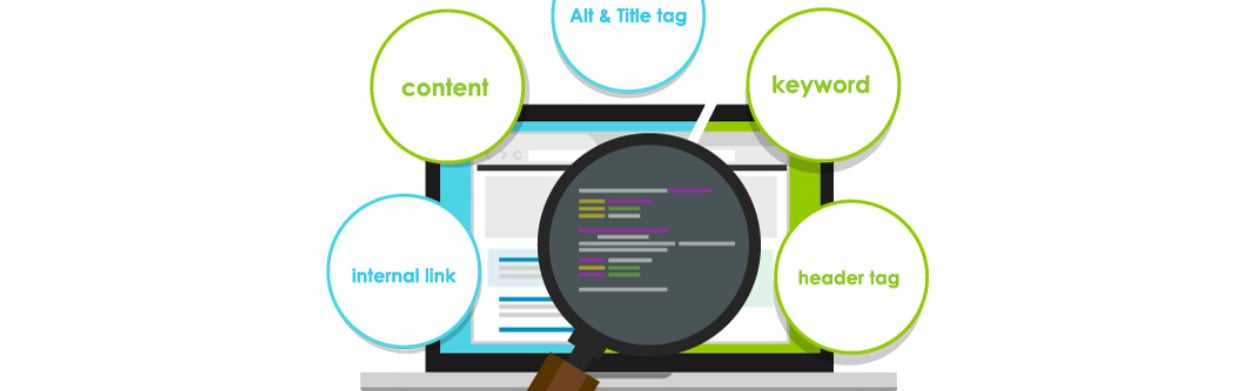
On Page Search Engine Optimization: A Practical Guide to Better Website Content
On-Page Search Engine Optimisation: A Practical Guide
On-page search engine optimisation (SEO) is the process of improving the content and structure of individual web pages so that search engines and visitors can understand them more easily. It helps search engines identify what a page is about, while making the page more useful and straightforward for people to use.
On-page SEO is not about repeating keywords as often as possible. It combines relevant, helpful content with clear page structure, descriptive titles, useful links and a good user experience.
Why on-page SEO matters
Search engines aim to provide results that are relevant to a person’s query. Clear page content and organisation can help them interpret a page and assess whether it may be useful for a particular search. Strong on-page SEO can also make it easier for visitors to find answers, navigate your website and take the next step.
It cannot guarantee a particular ranking. Search visibility is affected by many factors, including competition, the quality of other pages and the overall performance of a website. However, improving the elements you control on each page provides a sound foundation.
Key elements of on-page SEO
Useful, relevant content
Start with the needs of your intended reader. Consider what they are trying to learn or do, then create content that addresses that need clearly and accurately. A page should offer genuine value rather than simply repeating information found elsewhere.
Use plain language, explain unfamiliar terms and organise longer explanations into logical sections. Keep information up to date, and make sure any claims are supported by reliable sources where appropriate.
Search intent and keywords
Keywords are the words and phrases people use when searching. Research can help you understand how your audience describes a topic, but keywords should inform your content—not dictate awkward writing.
Before creating a page, consider the likely intent behind a search. Is the person looking for an explanation, comparing products or services, or ready to make a purchase? Shape the page around that need. Include relevant terms naturally in the main heading, introduction and body where they accurately describe the content.
Page titles and headings
The title element, often called the SEO title, helps describe a page in search results and browser tabs. Write a distinct, concise title that accurately reflects the page and gives people a clear reason to visit. Search engines may sometimes display a different title in results.
Use one clear main heading (<h1>) to introduce the page. Break up the content with descriptive subheadings (<h2> and, where useful, <h3>). A logical heading structure improves readability and helps both visitors and search engines follow the page.
Meta descriptions
A meta description is a short summary that may appear beneath a page title in search results. It is not a guaranteed ranking factor, and search engines may choose a different extract from the page. Even so, a clear, relevant description can help people decide whether the page is right for them.
URL structure
Use URLs that are short, readable and descriptive. For example, a page about garden maintenance might use example.co.uk/garden-maintenance rather than a long string of numbers or unclear words. Use hyphens to separate words, and avoid changing URLs unnecessarily. If a URL must change, set up a suitable redirect to help visitors and search engines reach the new address.
Images and alternative text
Images can make a page more engaging, but large files may slow it down. Resize and compress images appropriately, and choose formats suited to the image and website. Give image files meaningful names where practical.
Alternative text (alt text) should describe an image’s purpose or relevant information for people using assistive technology. If an image is purely decorative, it may be appropriate to leave the alt text empty. Avoid stuffing alt text with keywords.
Internal and external links
Internal links connect pages on your website. They help visitors discover related information and can help search engines find and understand your pages. Use descriptive link text that gives people a reasonable idea of what they will find after clicking.
External links to trustworthy, relevant sources can provide useful context or evidence. Link when it benefits the reader, and check that links work and lead to appropriate pages.
Mobile usability and page experience
Pages should be easy to read and use on mobile devices as well as desktop computers. Check that text is legible, navigation is clear, buttons are usable and important content is not hidden or difficult to access.
Page speed also matters to visitors. Reduce unnecessary scripts, optimise images and review your hosting and website setup. Technical performance can be assessed with tools such as Google PageSpeed Insights, though recommendations should be prioritised according to their likely impact and your site’s needs.
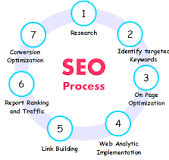
A straightforward on-page SEO process
- Choose a clear purpose: Decide what the page should help the visitor understand or do.
- Review the search results: Look at the types of pages appearing for relevant searches to understand what people may expect.
- Plan the content: Create a useful outline with a clear main heading and descriptive subheadings.
- Write for people: Answer the central question directly, provide useful detail and use relevant search terms naturally.
- Optimise page elements: Review the title, meta description, URL, images and links.
- Check the experience: Test the page on mobile, check accessibility and make sure it loads and works properly.
- Review performance: Use analytics and search performance tools to see how people find and use the page. Update it when information or user needs change.
Common on-page SEO mistakes
- Repeating keywords unnaturally or creating content mainly to include search terms.
- Publishing thin, duplicated or outdated pages that offer little value.
- Using vague headings, titles or link text.
- Adding images without considering file size or accessibility.
- Creating several pages that compete for the same purpose or search intent.
- Making changes without checking whether they improve the page for visitors.
How to measure results
Track measures that relate to the purpose of the page. These may include impressions and clicks from search results, relevant organic visits, enquiries, sales or other meaningful actions. Google Search Console can show how pages perform in Google Search, while an analytics platform can help you understand what visitors do after arriving.
Look for trends over time rather than judging a page by a single day or metric. Search rankings can fluctuate, and more traffic is not always better if it does not reach the right audience or support your goals.
Conclusion
Effective on-page SEO starts with a useful page that meets a real need. Clear writing, sensible structure, descriptive page elements, relevant links and a good mobile experience all help visitors and search engines understand your content. Review pages regularly, make changes based on evidence and prioritise improvements that genuinely make the experience better.
8 Essential Tips for Effective On-Page SEO Optimisation
- Use a unique, descriptive title tag for each page.
- Write a clear meta description that encourages clicks.
- Include your main topic in the page title and heading.
- Structure content with useful, descriptive headings.
- Create concise, readable URLs.
- Add descriptive alt text to meaningful images.
- Link to relevant pages on your site.
- Make pages fast, mobile-friendly and easy to navigate.
Use a unique, descriptive title tag for each page.
Use a unique, descriptive title tag for every page on your website. The title tag helps search engines and visitors understand what a page is about, and may appear as the clickable heading in search results and in a browser tab. Keep it concise and accurate, include the page’s main topic naturally, and make sure it reflects the content rather than relying on vague wording or repeated keywords. A distinctive title also helps users tell similar pages apart and choose the result that best matches their needs.
Write a clear meta description that encourages clicks.
Write a clear, accurate meta description that summarises the page and gives people a reason to visit. Keep it concise, include the main topic naturally and highlight what readers will gain. Avoid misleading claims or keyword stuffing; search engines may display a different description, but a helpful summary can encourage relevant clicks.
Include your main topic in the page title and heading.
Include your main topic in the page title and main heading to make the purpose of the page clear to both visitors and search engines. Use wording that accurately reflects the content, and keep it natural rather than cramming in keywords. A clear, relevant title and heading help people quickly understand what the page offers and decide whether it answers their needs.
Structure content with useful, descriptive headings.
Use clear, descriptive headings to organise your content into sections and show readers what each one covers. A logical hierarchy—starting with a main heading followed by relevant subheadings—makes a page easier to scan and understand, while helping search engines interpret its structure. Keep headings specific and natural, and avoid forcing in keywords where they do not fit.
Create concise, readable URLs.
Create concise, readable URLs that clearly describe the page and are easy for people to understand at a glance. Use relevant words, separate them with hyphens and leave out unnecessary numbers, symbols and filler words. For example, example.co.uk/on-page-seo is clearer than a long, complicated URL. A descriptive address can help visitors recognise what a page is about, so keep it simple and avoid changing it unless necessary.
Add descriptive alt text to meaningful images.
Add descriptive alt text to meaningful images so people using screen readers can understand the information they convey. Keep the wording concise and specific to the image and its purpose in the page, rather than stuffing it with keywords. For decorative images that add no useful information, use empty alt text so assistive technology can skip them. Alt text also helps search engines interpret image content, but accessibility and clarity should come first.
Link to relevant pages on your site.
Link to relevant pages on your website to help visitors discover useful related information and navigate your content more easily. Internal links can also help search engines understand how your pages are connected. Use clear, descriptive link text that explains what the linked page is about, and add links naturally where they provide genuine value to the reader.
Make pages fast, mobile-friendly and easy to navigate.
Make every page fast, mobile-friendly and easy to navigate. Compress images, reduce unnecessary scripts and check that pages load smoothly on different devices and connection speeds. Use readable text, clear menus and well-labelled links or buttons so visitors can quickly find what they need. A positive page experience helps people engage with your content and supports your wider on-page SEO efforts.


Leave a Comment